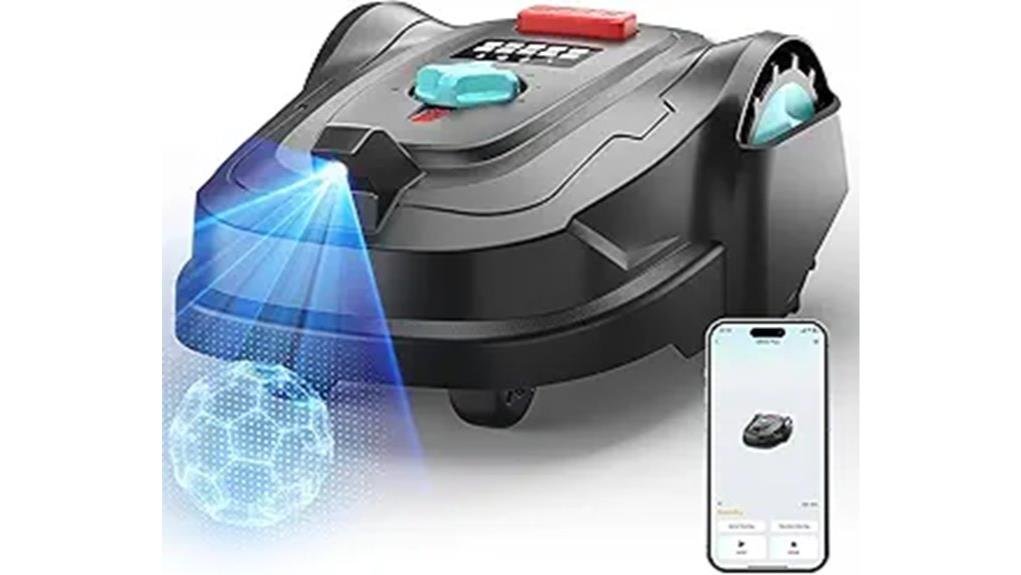
You’ll get mostly hands-off mowing for lawns up to about 8,600 sq.ft.; the M800PLUS uses a 135° HD camera and AI obstacle detection so you can skip wiring and let it reroute around toys and rocks. It cuts with a three-blade 7″ disc, handles slopes to 35%, and returns to charge automatically. Setup needs level docking and shorter initial grass, while the YardCare app handles schedules and updates—keep going to see setup tips, limits, and maintenance advice. WORX Landroid M performance features ensure efficient mowing, letting you focus on other tasks while the robot does the work. Its advanced technology adapts to various terrains, providing a consistent cut even on challenging inclines. Additionally, the machine’s ability to navigate around obstacles effectively enhances the overall mowing experience.
Some Key Takeaways
- The M800PLUS uses a 135° HD camera and AI obstacle detection, letting it mow without perimeter wire on clear-boundary lawns up to ~8,600 sq.ft.
- Cutting performance is consistent with a 7″ three-blade disc, mixed-row/random patterns, and height 0.8–2.4″ for tidy finishes.
- Handles slopes up to 35% and reroutes around toys, rocks, and small obstacles in real time.
- Setup requires initial manual trimming if grass >2.6″, level dock placement, Wi‑Fi/YARDCARE app onboarding, and occasional firmware updates.
- Strengths: excellent vision and app scheduling; drawbacks: best for simple yards and eventual battery replacement costs.
Quick Verdict: Who the M800PLUS GPS+3D Vision Is Best For
If you want a mostly hands-off mower for a clear-boundary lawn up to about 8,600 sq.ft., the M800PLUS GPS+3D Vision is a strong fit — it uses a 135° HD camera and AI obstacle detection so you don’t need a perimeter wire, handles slopes up to 35%, and lets you schedule and control everything from the YARDCARE app. You’ll appreciate reliable autonomous mowing, smart obstacle avoidance, and communal confidence when neighbors ask. Follow safety protocols for initial setup and taller grass. Check warranty details for coverage and support. Ideal if you want time back, consistent cuts, and easy app-based control. The M800PLUS integrates well with a robotic mower lifestyle, making it a natural choice for homeowners who want to enjoy their outdoor spaces with less hands-on upkeep.
Key Specs at a Glance : Area, Cutting, Battery, and Sensor Capabilities
When you’re sizing up the M800PLUS GPS 3D Vision, focus on four practical pillars: coverage (up to about 8,611 sq.ft.), cutting (7″ disc with three rotating blades and a 0.8–2.4″ height range), battery/charging (cordless operation with automatic return-to-charge), and sensors (135° HD camera plus AI obstacle detection and slope handling to 35%). You’ll get clear area coverage guidance for small yards, a compact blade width that balances precision and speed, and reliable battery life with autonomous recharge. The sensor suite supports safe, shared-use confidence so you and your neighbors feel secure while the mower works. Consider pairing the mower with a backpack blower for efficient post-mow cleanup and leaf management.
Real-World Performance : Navigation, Obstacle Handling, Slopes, and Cutting Quality
Although the M800PLUS GPS 3D Vision looks compact, it navigates like a much smarter machine. You’ll notice precise pathing from the 135° camera performance and AI detection, which separates grass from obstacles so you won’t constantly intervene. It handles common toys and rocks reliably, rerouting in real time, and climbs slopes up to 35% without bogging down. Cutting quality is consistent: the three-blade disc and mixed row/random pattern give even coverage across up to ~8,600 sq.ft. You’ll appreciate weather resilience—rain-tolerant sensors and auto-return protect the mower—so it feels like part of your trusted yard routine. Owners who enjoy outdoor tools often pair their mowers with specialized accessories for leaf and debris control, like leaf blower gear, to keep lawns pristine.
Setup, App Control, Scheduling, and Maintenance You’ll Actually Do
Because the initial setup mostly takes a few straightforward steps, you’ll have the M800PLUS up and mowing quickly: unpack, charge the battery, trim any grass taller than 2.6 inches, and mount the charging dock on level ground with good GPS/visual sightlines. Use the YARDCARE app for app onboarding — account, Wi‑Fi, and permissions take minutes. Schedule regular cycles, tweak partial/random patterns, and set spot mowing sessions. Keep spare blades and blade storage labeled. Perform simple seasonal prep, clean the deck, and test sensors. For OTA issues, follow firmware troubleshooting steps in-app or contact the community-support channel. The site also offers a range of options for battery-powered mowers and accessories that complement the M800PLUS.
Pros, Cons, and Final Buying Recommendation (When to Choose It or Skip)
If you want a hands-off mower for a clear-boundary yard up to about 8,600 sq.ft, the M800PLUS delivers precise navigation, strong obstacle avoidance, and reliable autonomous cycles that really cut down weekend yard work. Pros: excellent AI vision, tidy cuts, manageable noise levels, and intuitive app scheduling that helps you belong to a modern lawn-care group. Cons: limited to clear boundaries, battery lifespan depends on usage and eventual replacement costs, and occasional manual trimming before first run. Check subscription requirements for cloud features and confirm warranty coverage. Choose it for convenience; skip it for complex, boundary-less lots. This mower is ideal for homeowners who enjoy their outdoor spaces and want cordless mower convenience.
Some Questions Answered
Does It Work Reliably in Heavy Rain or While Wet?
No — it isn’t reliable in heavy rain or fully wet conditions. You’ll want to avoid mowing underwater or during downpours because the waterproof rating limits prolonged exposure. That said, the mower’s drainage performance handles light moisture and damp grass; it sheds water from housings and deck to protect electronics. You’ll feel included following recommended use: pause operation in heavy rain, resume when turf’s drier, and rely on drainage performance for normal wetness.
Can It Be Scheduled to Avoid Specific Neighbors’ Lawns?
Yes — you can. You’ll set virtual fences in the app to keep the mower off neighbors’ lawns, and you’ll get neighbor alerts if the robot approaches a boundary or detects encroachment. You’ll schedule mowing times and no-go zones, so it respects property lines automatically. You’ll feel confident sharing space, knowing the mower’s GPS, 3D vision and alerts help you maintain good neighbor relations with minimal fuss.
What Is the Noise Level in Decibels During Operation?
You’ll hear about 58–62 dB during operation. Measurements reported place it near a normal conversation or quiet office level, so it’s noticeably quieter than a traditional gas mower. You’ll appreciate the audible comparisons when deciding where and when to run it — neighbors will likely find it unobtrusive. You’ll control schedules via the app to fit shared spaces, and you’ll feel included choosing a quieter, community-friendly option.
Are Replacement Blades and Batteries Readily Available?
Yes — replacement availability is strong; you’ll find blades and batteries through the manufacturer, major retailers, and third-party suppliers. You’ll want to confirm battery compatibility with the M800PLUS battery model before buying third-party cells. Keep spare blades handy and replace them regularly for best cuts. The ecosystem supports easy sourcing, and community forums help you pick compatible batteries and trusted aftermarket blade options so you won’t feel isolated.
Does It Support Multiple User Accounts or Shared Access?
Yes — you’ll get multi user support and family sharing through the YARDCARE App. You can invite household members, set role-based permissions, and share schedules so everyone feels included in lawn care. You’ll manage access, receive activity notifications, and let others start or pause mowing remotely. It’s designed for simple, secure shared control so your family can coordinate maintenance without stepping on each other’s toes.