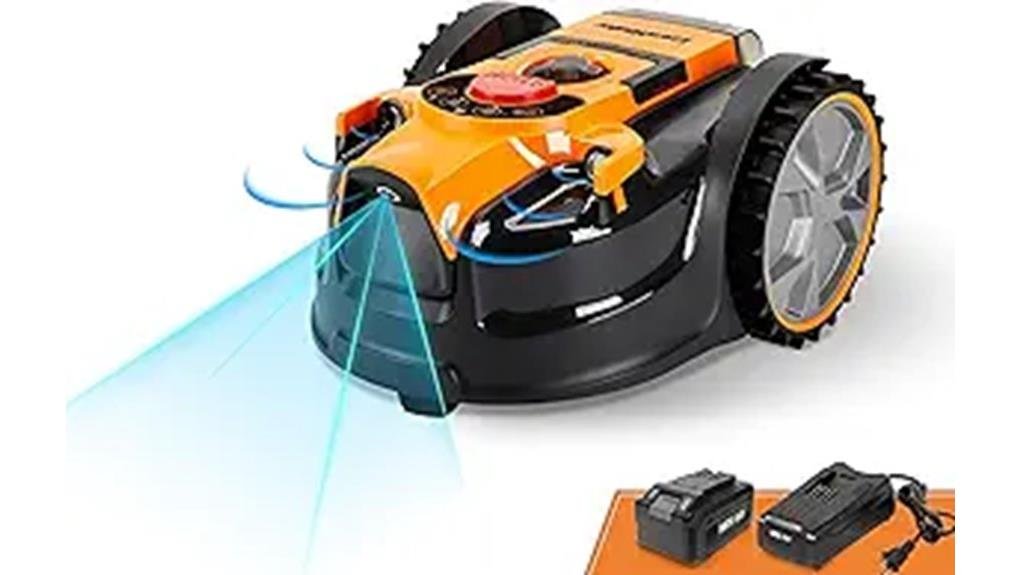
If you want a low‑fuss, perimeter‑wire‑free robot for small yards, the LawnMaster OcuMow™ is worth considering. You’ll place it on the grass and press start—no app pairing or outlet needed—and it uses optical navigation plus ultrasonic sensors to cover about 1,000–2,000 sq ft per session. It handles slopes up to 35% and avoids small obstacles, but you’ll still need edge touch‑ups and periodic blade and sensor maintenance. Keep going to see detailed setup, performance, and maintenance notes. LawnMaster OcuMow™ features and benefits include its lightweight design, making it easy to transport and reposition as needed. Additionally, the robotic mower operates quietly, allowing you to enjoy your outdoor space without disruption. With its efficient cutting patterns, you can achieve a beautifully manicured lawn without the hassle of traditional mowing methods.
Some Key Takeaways
- Perimeter-wire-free OcuMow uses optical navigation and ultrasonic sensors for predictable coverage up to about 2,000 sq ft.
- Drop-and-mow setup requires no app or outlet; a 33 ft magnetic no-go strip defines virtual fences.
- Runs roughly three hours per charge, with optional spare MX 24V battery for larger yards.
- Handles slopes up to 35% and avoids obstacles as small as six inches, but edges need manual trimming.
- Low-fuss ownership ideal for small yards, though long-term durability and heavy-use battery needs are uncertain.
What the LawnMaster OcuMow™ Is and Who It’s Best For
While it looks compact, the LawnMaster OcuMow™ is a self-contained, perimeter-wire-free robotic mower built for small yards, using optical navigation and ultrasonic sensors to find and avoid obstacles while you get hands-off mowing. You’ll appreciate its compact design and quiet operation as it navigates up to 2,000 sq ft, climbing slopes and rerouting around toys or flowerpots. It’s best if you want reliable, low-maintenance care without fussing with wires or constant monitoring. You’ll fit right in with neighbors who value tidy lawns and shared ease — this mower earns its place when simplicity and steady results matter. It pairs well with a homeowner’s outdoor lifestyle and interest in robotic mower products.
How Setup Works: Drop‑and‑Mow, No‑Go Magnetic Strip, and What You’ll Need
If you like the idea of a set-and-forget mower, the OcuMow keeps setup simple: you’ll place the mower on the grass, press start, and let it work—no app pairing or outdoor power outlet required. You’ll still run a quick inspection: check battery placement for secure contact, attach the 33 ft magnetic no‑go strip where needed, and push pegs to hold it. The drop‑and‑mow flow gets you mowing fast; the magnetic strip creates virtual fences without digging. Keep a basic toolkit for installation troubleshooting—clips, spare pegs, and the extra blades included—so your community of users stays confident. For homeowners who enjoy tending their yards, pairing the mower with recommended string trimmer gear can streamline edge maintenance.
Real‑World Performance: Coverage, Runtime, Slope Handling, and Obstacle Avoidance
When you put the OcuMow to work on a typical small lawn, it delivers predictable coverage and solid runtime—about 1,000–2,000 sq ft per session with up to three hours on a charge—though larger yards will need additional battery swaps or charging breaks. You’ll notice consistent coverage patterns thanks to optical navigation; it maps grass confidently and avoids random gaps. Slope handling is strong—35% climbs feel secure—and deep‑tread wheels keep traction. Ultrasonic obstacle avoidance steers around items as small as six inches. Watch charge cycles for planning, define perimeters clearly, and you’ll feel supported using it regularly. Perfect for homeowners who enjoy their outdoor space, it complements other battery-powered mowers in a backyard equipment lineup.
Maintenance, Edge Care, and Battery Options for Larger Yards
After regular use, plan a short maintenance routine to keep the OcuMow running reliably and your lawn tidy. You’ll clean underside clippings, check blades and wheel treads, and update the intake camera lens for optical navigation. Follow a seasonal maintenance checklist: deep clean and inspect before heavy growth seasons, replace worn blades, and test sensors. Edge care still needs a trimmer; use the magnetic No Go strip to protect borders but expect occasional touch‑ups. For larger yards, buy an extra MX 24V battery and rotate charges to extend coverage. Keep a blade sharpening schedule and spare blades on hand. Upgrade your yard with compatible accessories like leaf blower gear to streamline outdoor maintenance.
Should You Buy It? Pros, Cons, and Best Alternatives for 1,000–2,000 Sq Ft Lawns
Because it’s built specifically for small yards, the OcuMow makes sense if you want a low‑fuss robot that actually mows 1,000–2,000 sq ft without wiring trenches or app setup. You’ll appreciate drop‑and‑mow simplicity, solid slope and obstacle handling, and included magnetic strip for quick No Go zones. Pros: easy setup, good traction, short runtime suits small sites. Cons: edge trimming still needed, extra battery for heavy use, unknown long term durability versus established brands. If you want alternatives, consider models with proven longevity or modular batteries for easier seasonal adjustments and confident ownership. Consider keeping essential maintenance gear, like a blade sharpener and cleaning brush, on hand to prolong mower life and performance (Essential Gear).
Some Questions Answered
Does It Work on Artificial Turf or Synthetic Lawns?
Yes — you can use it on artificial turf and synthetic lawns, but you’ll want to test first. You’ll enjoy its optical navigation and obstacle sensing, yet blades and wheel traction may wear turf fibers and won’t trim edges cleanly. You’ll need to monitor for scuffing, adjust runtime to avoid overheating, and keep edges trimmed manually. If you value care for your shared space, plan gentle trials and consider protective settings or surface reinforcement.
Can It Mow Wet or Recently Rained-On Grass?
Yes — you can run it on wet or recently rained-on grass, but proceed cautiously. You’ll notice higher blade clogging risk and occasional traction loss on soaked slopes. Start with short sessions, clear standing water, and check blades more often. Stay with the mower initially so you can redirect it from slick spots. If you want consistent results and belonging to other careful users, let very wet lawns dry before full runs.
Is Wi‑Fi or Smartphone Control Available Later?
No — there’s no built‑in Wi‑Fi or smartphone control now, and you can’t remote pair the mower today. You’ll want to watch for future updates from the maker that could add wireless features or a companion app. If connectivity matters, plan to wait or choose a different model that supports remote pairing. You’ll feel included in their community by checking forums and signing up for firmware and feature announcements.
How Loud Is the Mower During Operation (Decibels)?
You’ll hear about 60–65 dB during operation. That sound level feels like a quiet conversation nearby and is lower in a noise comparison with many gas mowers. You’ll notice a steady, unobtrusive hum rather than harsh clatter. You’ll be able to chat or relax outdoors while it runs, though you might still trim edges manually for perfect results. You’ll appreciate how it blends into neighborhood life.
What Warranty and Customer Support Options Exist?
You get a limited warranty covering defects for a set period, and phone support for troubleshooting and parts help. You’ll register the mower to activate warranty; retain purchase proof. If something fails, call phone support first — they’ll guide diagnostics, repairs, or replacement steps. You’ll feel supported joining other owners; extended service or extra batteries may cost extra, so check terms before you rely on coverage.